BYOK and AI Cost Controls
Configure BYOK and control AI-related credit usage.
Who this is for
This page is mainly for organization admins and owners. They control provider keys, routing, and cost visibility for the whole org.
What BYOK means
BYOK (Bring Your Own Keys) means your organization connects and uses its own LLM provider key (OpenRouter, OpenAI, Anthropic, or Google) instead of TalentSourcer AI managed mode.
This is different from TalentSourcer Local, which runs supported work through Codex or Claude Code authenticated on your Mac. Open the TalentSourcer Local Guide.
Why teams choose BYOK
- You get more candidate checks out of the same subscription spend.
- BYOK usually lowers overall check cost because managed pricing needs conservative buffers for variable data complexity.
- You get more steering power by choosing provider and model per action.
- You can use stronger models for harder searches and cheaper models for high-volume workflows.
Recommended provider
We recommend OpenRouter first.
- Broad model coverage in one setup
- Flexible model choice per workflow action
- Strong speed and availability behavior across providers for the same model
Setup in 4 steps
- Open provider settings. https://next.talentsourcer.ai/settings#llm-providers
- Paste key and click Save key.
- Click Validate key.
- Confirm status shows Connected.
Track estimated AI cost in settings
You can track estimated usage and cost from two angles.
1) Provider and model level
In LLM Providers (BYOK), you can see:
- Last 7 days estimated USD and tokens
- 30-day provider breakdown
- Top models (30 days)
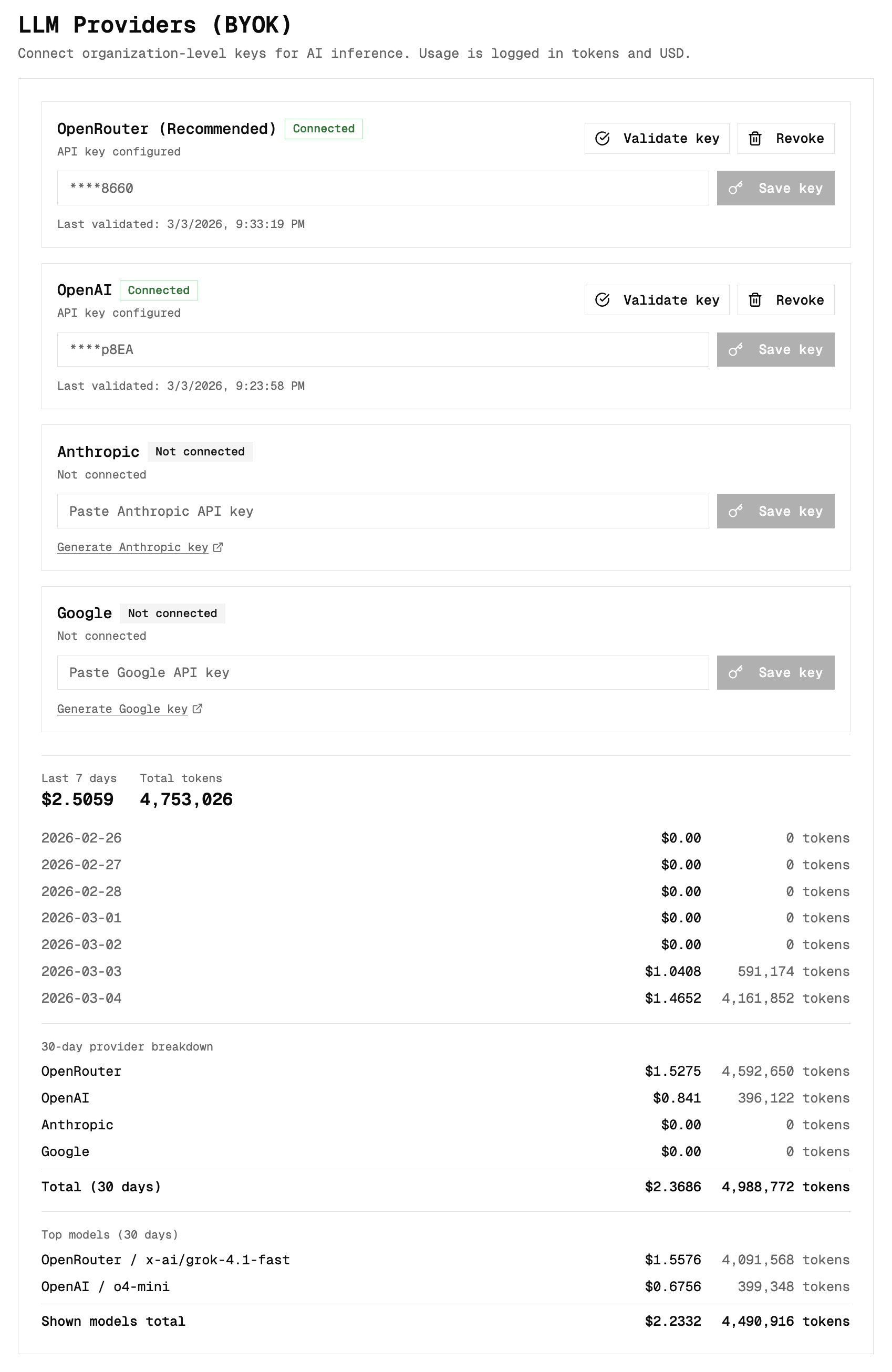
2) Action level averages
In LLM Routing by Action, each action shows:
- 30d runs
- Avg estimated USD per run
- Avg tokens per run
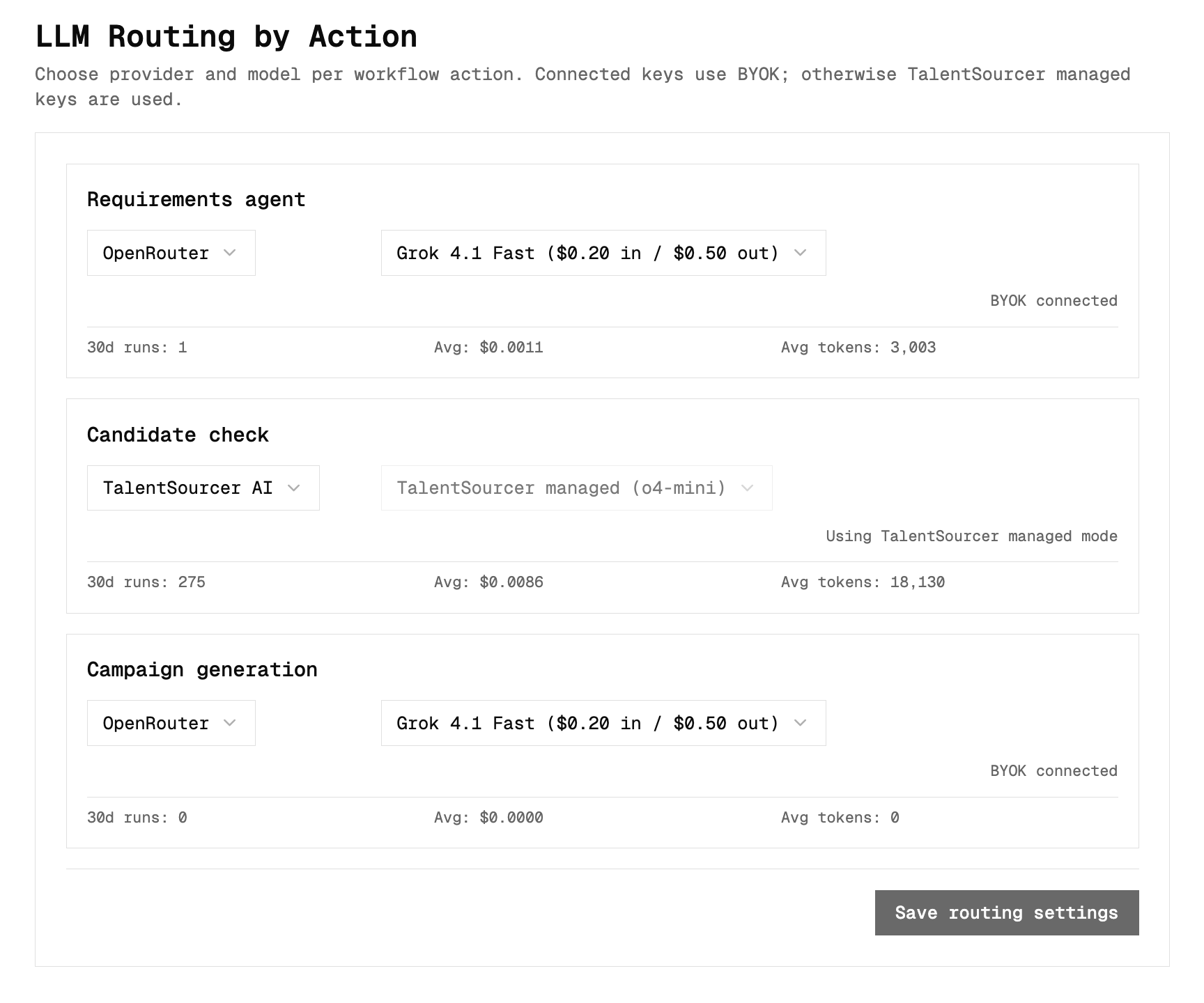
This helps you spot where to optimize first.
Routing and model choice
Use TalentSourcer AI managed defaults as your baseline. They are tuned for strong cost/performance balance.
- If you need more quality, choose a stronger model.
- If you need lower cost, choose a cheaper model.
- Save routing settings after changes.
Open routing settings here: https://next.talentsourcer.ai/settings#llm-providers
Candidate check credit model (quick reference)
| LLM mode | New check | Existing recent check |
|---|---|---|
| Managed | 4 credits | 2 credits |
| BYOK | 1 credit | 0 credits |
Existing recent checks are based on your candidate recency window setting.
Candidate recency window
Recency window controls how long a previous check still counts as recent for pricing.
- Options: 30, 60, 90 days
- Higher window usually reduces average check cost
Open recency settings here: https://next.talentsourcer.ai/settings#candidate-recency-window
Need the full candidate check billing context too? Open Candidate Checks Guide